Skin Crate Shop – Roblox Crate GUI
On Sale
$3.99
$3.99
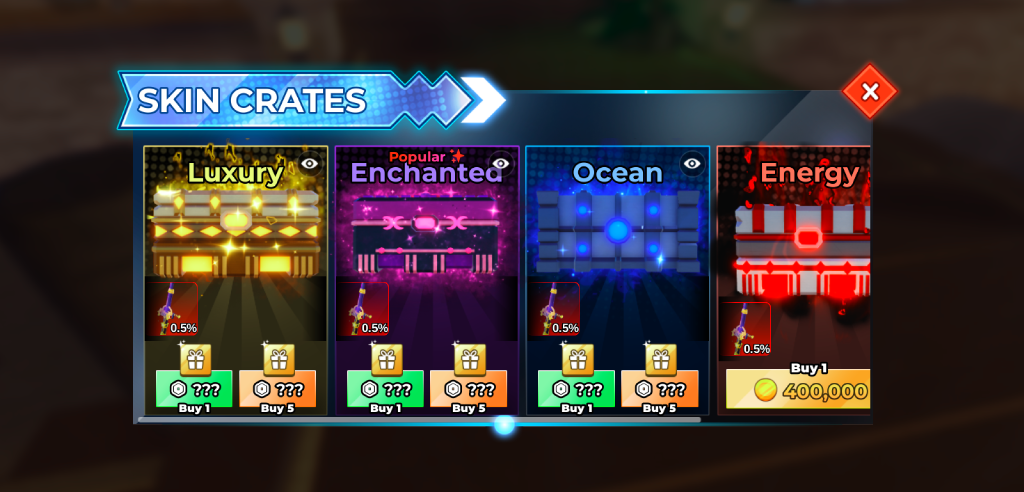
This Roblox Skin Crates GUI provides a dedicated interface for browsing and purchasing different skin crates. The layout displays multiple crate categories with individual artwork, skin previews, drop chances, purchase options, and currency prices.
The interface includes Luxury, Enchanted, Ocean, and Energy crate cards, along with a horizontal navigation bar for additional selections. A close button is positioned in the upper-right corner of the panel.
Key Features
- Roblox Skin Crates shop interface for browsing available skin crates
- Multiple skin crate cards displayed within a horizontal shop layout
- Luxury skin crate with gold-themed crate artwork
- Enchanted skin crate with purple-themed crate artwork
- Ocean skin crate with blue-themed crate artwork
- Energy skin crate with red-themed crate artwork
- Individual skin preview displayed on each crate card
- Drop chance percentage displayed for featured skin items
- Buy 1 button for purchasing individual skin crates
- Buy 5 button for purchasing multiple skin crates
- Currency price display for individual crate purchases
- Gift icons included above the crate purchase buttons
- Eye icons displayed for skin preview or viewing controls
- Popular label displayed on the featured Enchanted crate
- Horizontal scrollbar for navigating through additional crate options
- Large Skin Crates header across the top of the interface
- Close button positioned in the upper-right corner
- Dark shop panel with different visual themes for each skin crate
- Suitable for Roblox skin crate and skin collection interfaces
69f20bc5b49e7fefae83f7d6