Settings Menu – Roblox Configuration GUI
On Sale
$3.99
$3.99
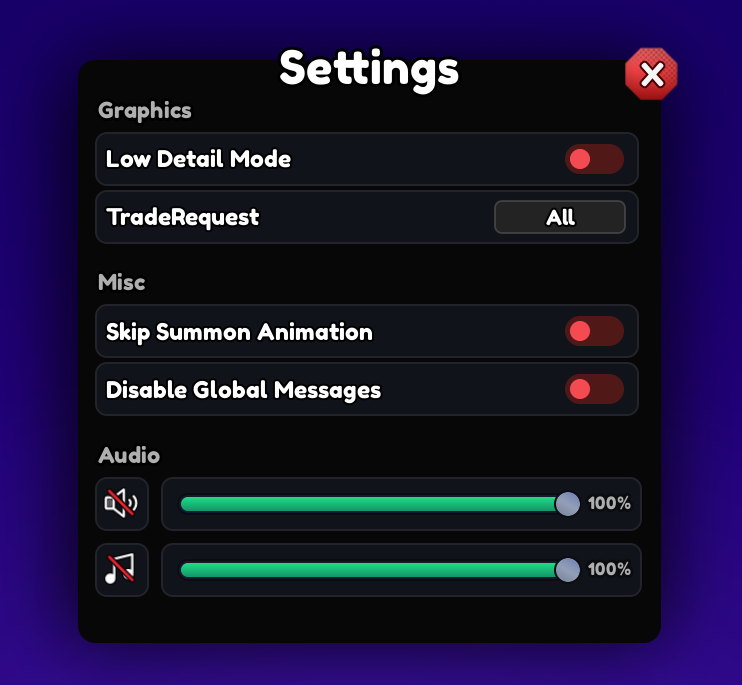
This Roblox settings menu provides a categorized interface for managing graphics, trade requests, miscellaneous options, and audio preferences. The layout uses separate sections with toggle controls, selection buttons, audio icons, and volume sliders.
The interface features a dark panel with a purple background, a centered Settings heading, and a close button in the upper-right corner. This is a GUI asset only and does not include the underlying settings systems or scripting.
Key Features
- Categorized Roblox settings menu with Graphics, Misc, and Audio sections
- Low Detail Mode toggle for a graphics-related interface option
- Trade Request selection control displaying the All option
- Skip Summon Animation toggle within the Misc settings section
- Disable Global Messages toggle for message preference controls
- Separate audio controls for managing different volume categories
- Horizontal volume sliders with adjustable-looking control handles
- 100% percentage indicators displayed beside both audio sliders
- Speaker and music icons for identifying separate audio controls
- Toggle controls with clearly visible on and off-style interface states
- Large Settings title positioned at the top of the configuration panel
- Dedicated close button for exiting the settings interface
- Dark rectangular settings panel with rounded corners
- Purple-themed background surrounding the main settings panel
- Organized spacing between individual configuration categories
- Suitable for Roblox game configuration and settings menus
- GUI only with no included settings systems or scripting
69f20bc5b49e7fefae83f7d6