Server Access Lock Controller – Roblox Administration System
On Sale
$1.99
$1.99
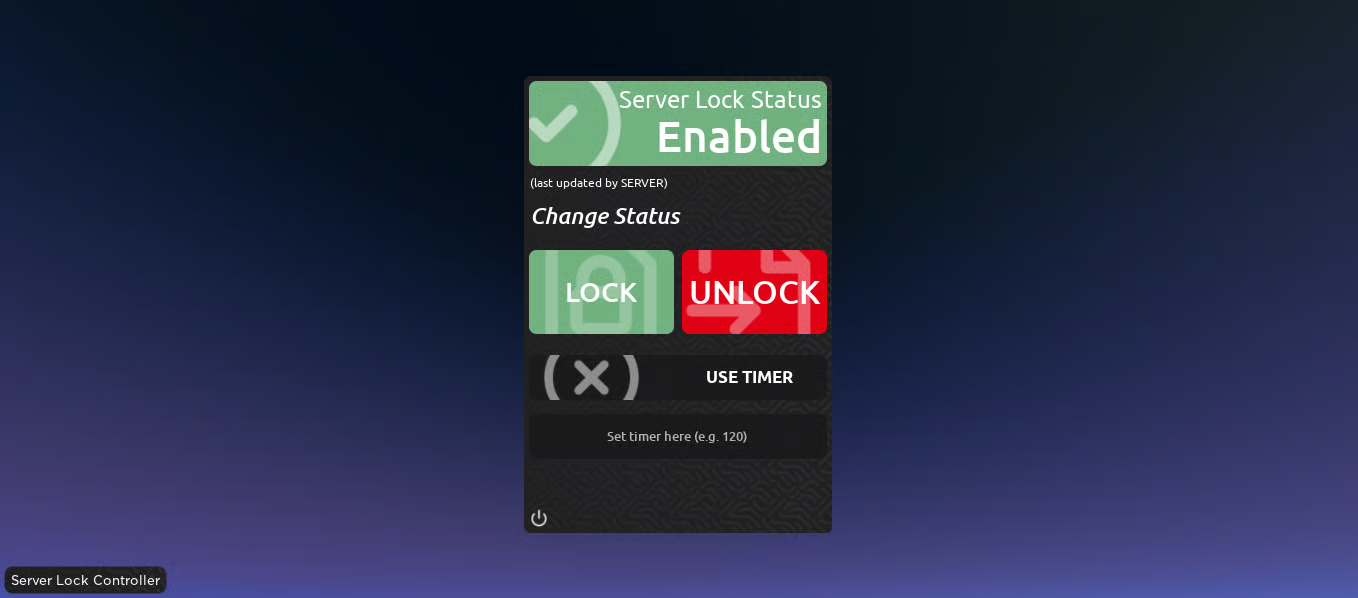
Server Access Lock Controller provides an easy way to control whether a Roblox server is locked or unlocked. The system includes a dedicated control panel showing the current server lock status and providing direct controls for changing access.
The system supports Group, Rank, and PlayerID compatibility, allowing access permissions to be configured around different player identification methods. Administrators can also control the lock through chat commands or the included panel.
A timer option allows the server to automatically change its lock status after a specified period. Commands and their prefixes can be modified to fit the administration setup of your game.
Key Features
- Dedicated server lock management system
- Server Lock Status display
- Clear Enabled status indicator
- Direct LOCK control
- Direct UNLOCK control
- Group compatibility
- Rank compatibility
- PlayerID compatibility
- Chat command support
- Control panel for opening and closing the server
- Timer-based server lock control
- Configurable timer duration
- Timer input for specifying the desired duration
- Automatic lock or unlock control through the timer system
- Modifiable administration commands
- Customizable command prefixes
- Permission-based administration options
- Centralized server access management
- Simple control panel layout
- Server-side status display
- Status indicates when the server state was last updated by the server
- Designed for staff-controlled Roblox experiences
- Useful for temporarily restricting server access
Video here
6ab11ce6d13ddd4440d819cc