




Your Cart
Loading

Long-Range Narrowbody Jet – Roblox Driveable Aircraft

On Sale
$2.99
$2.99
Added to cart

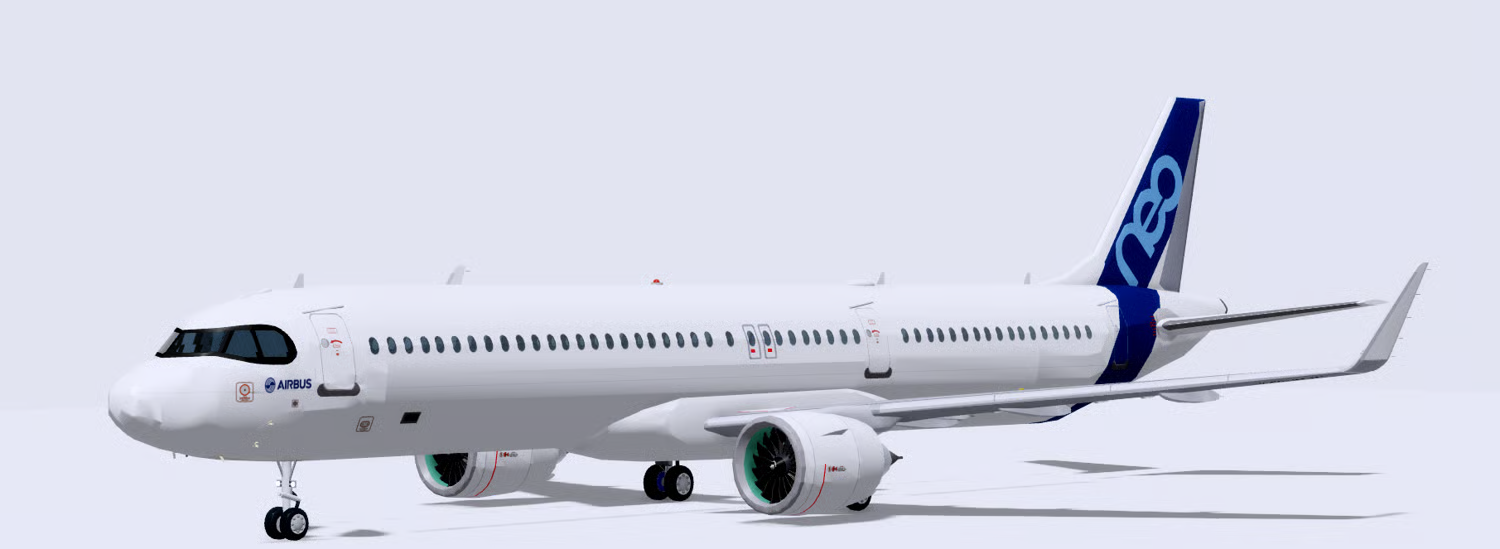
This driveable narrowbody passenger aircraft is designed for Roblox airline, airport, and aviation experiences. The CSG-built model features a long commercial-airliner fuselage, twin underwing engines, swept wings, winglets, cockpit windows, passenger windows, and landing gear.

The aircraft includes a simple interior with overhead storage bins and dividers, along with aircraft sounds and animated components. Passenger seats are not included, leaving the cabin available for developers to add their own seating and customize the interior.

A flight interface provides operational information including speed, altitude, throttle, engine status, and taxi status. Additional aircraft system panels display controls and indicators for lighting, landing gear, flaps, spoilers, and other aircraft functions.


Key Features


  • Driveable narrowbody passenger aircraft
  • CSG-built aircraft model
  • Animated aircraft components included
  • Aircraft sounds included
  • Long commercial-airliner fuselage
  • Twin jet engines mounted beneath the wings
  • Detailed engine fan geometry
  • Swept main wings
  • Upward-curved winglets
  • Large vertical tail stabilizer
  • Rear horizontal stabilizers
  • Detailed cockpit window section
  • Long rows of passenger windows
  • Dedicated nose landing gear
  • Multi-wheel main landing gear
  • Simple cabin interior structure
  • Passenger seats are not included
  • Open cabin space for custom seating
  • Overhead storage bins included
  • Interior dividers included
  • Cabin structure can be customized for different airline layouts
  • Flight control interface included
  • Speed indicator displayed through the aircraft UI
  • Altitude indicator displayed through the aircraft UI
  • Throttle indicator included
  • Engine status display
  • Taxi status indicator
  • Aircraft systems control panels
  • Multiple aircraft lighting indicators
  • Flaps settings displayed through the systems interface
  • Spoiler settings displayed through the systems interface
  • Landing gear status indicator
  • Multiple red and green aircraft system status indicators
  • Graphical aircraft system controls
  • Detailed exterior aircraft doors
  • Commercial-airliner exterior proportions
  • White exterior suitable for custom airline liveries
  • Player-controlled aircraft operation
  • Suitable for airline roleplay experiences
  • Suitable for airport environments
  • Can be incorporated into flight simulation experiences
  • Cabin provides a base for developers to add custom passenger seating
  • Combines driveable functionality, animations, sounds, and aircraft systems


6ab11ce6d13ddd4440d819cc
You will get a RBXM (3MB) file

KW Studio • Product Guide

Before you use this product

Review the detected asset type, seller context, setup requirements and testing steps before adding this Roblox Studio product to a live experience.

This Roblox Studio asset is listed through KW Studio. Review the live product description, screenshots, seller details, delivery information and setup expectations before use.
Asset type Roblox Studio Asset
Seller Seller shown on page
Availability Shown on product page
Seller status Seller details shown on page

Seller context

Seller shown on this product page

Marketplace seller

KW Studio shows seller details on the product page when available. Full seller background information belongs on the seller profile page, while this product FAQ focuses on product setup, delivery, testing, and buyer expectations.

Product questions and setup guidance

Answers are adapted automatically from the live product page, detected asset type and available seller information.

This is a downloadable Roblox Studio asset listed through KW Studio. Review the product title, screenshots, description, visible features, seller information, and file expectations before using it in a live Roblox experience.

When a KW Studio product page shows a Verified Seller badge, it means the seller has passed KW Studio’s seller verification checks shown on the page. Buyers should still review the product description, screenshots, and setup expectations before purchase or download.

This product is sold by the seller shown on this page. When available, KW Studio displays the seller name, contact options, seller tags, and a seller profile link. Longer seller background information should be reviewed on the seller profile page instead of inside the product description.

Download the file, open or import it inside Roblox Studio, review the Explorer structure, and test the asset in a separate place before adding it to your main project.

This asset can be useful for Roblox developers who want a faster starting point, but the final use depends on your project goals, game structure, customization work, and testing process.

Test the asset in Roblox Studio before publishing. Check file structure, scripts if included, scale, performance, mobile usability, permissions, missing parts, and whether the asset fits your own game.

Some Roblox Studio assets may require importing, configuration, testing, ID replacement, scripting knowledge, or customization depending on what is included.

For product-specific questions, use the seller contact methods shown on this product page when available. For marketplace support, download issues, duplicate purchases, mistaken purchases, unclear listings, or escalation, contact KW Studio support.

KW Studio products are downloadable Roblox Studio assets. Free products and paid products should both be tested before use. Paid purchases are generally final once delivery or download access begins, except where required by law or where KW Studio determines that a genuine delivery, duplicate purchase, seller, or product issue requires support action.

Digital product notice: KW Studio products are downloadable Roblox Studio assets. Free products and paid products should both be tested inside Roblox Studio before publishing. Paid purchases are generally final once delivery or download access begins, except where required by law or where KW Studio determines that a genuine delivery, duplicate purchase, seller, or product issue requires support action. If you believe you purchased by mistake, do not download the file and contact help@kwstudio.org. Review the KW Studio Digital Delivery Policy and KW Studio Digital Asset License before purchase.