Advanced Team Leaderboard GUI – Roblox Team UI System
On Sale
$2.99
$2.99
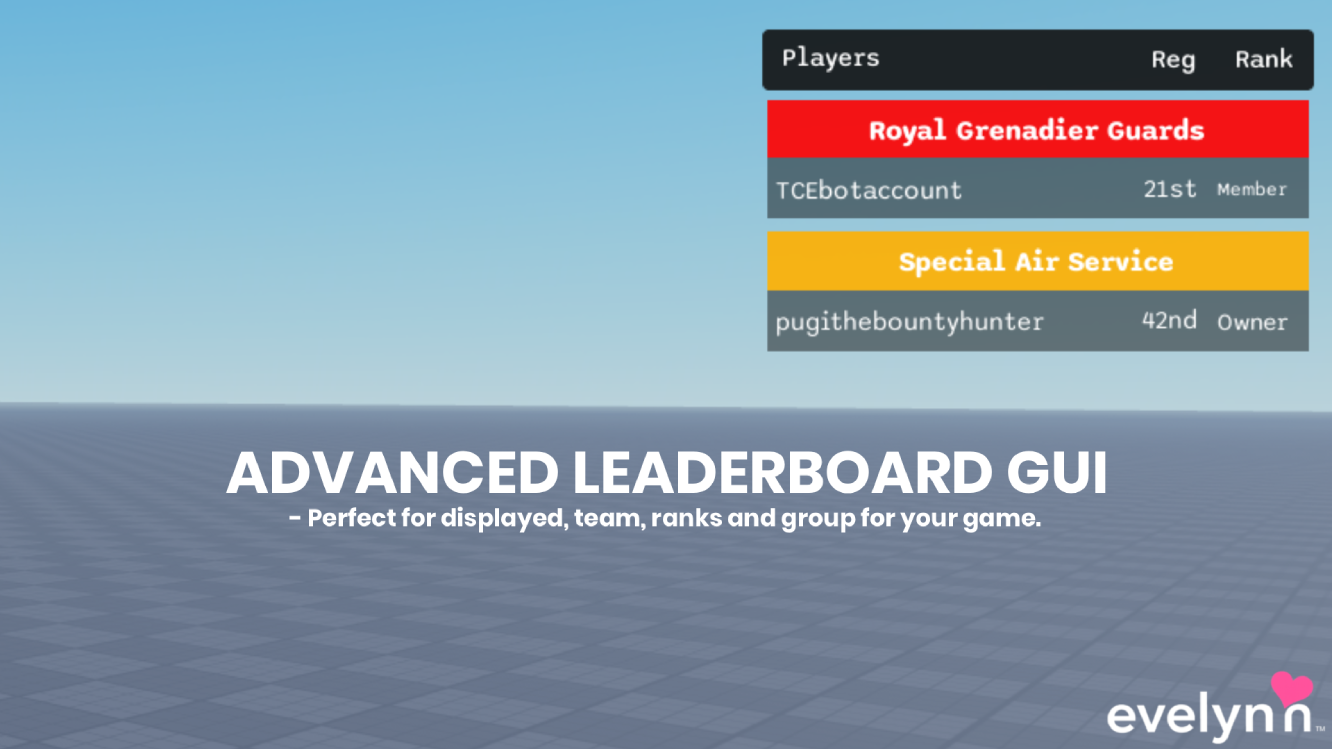
A modern Tab-based leaderboard GUI for Roblox that automatically organizes players according to their current team. The panel slides in from the right when opened and displays only teams with active players.
Each team section can display player usernames along with optional Reg and Rank information retrieved from configured Roblox Group IDs. Different teams can use different display modes, including Username-only layouts that hide the Reg and Rank columns.
The system includes a configurable module for team mappings, Group IDs, rank modes, sorting, spacing, animations, and fallback behavior, along with a client controller for rendering and updating the leaderboard.
Key Features
- Tab-toggle leaderboard panel with smooth open and close controls
- Right-side slide animation with configurable tween duration and easing style
- Automatic player grouping based on current Roblox team
- Active team filtering that hides teams with no players
- Username display for players within each team section
- Configurable RegText column for team-specific registration information
- Roblox Group-based Rank information using configured Group IDs
- Role-name rank mode using GetRoleInGroup
- Numeric rank mode using GetRankInGroup
- Per-team display modes for customizing which player information is shown
- Username-only team mode that hides Reg and Rank columns when configured
- ScrollingFrame support for large player lists and multiple teams
- Configurable team mappings and Group ID settings
- Customizable player and team sorting behavior
- Adjustable spacing and leaderboard layout settings
- Configurable animation settings and fallback behavior
- Client controller for Tab input, leaderboard building, and refresh handling
- Automatic updates when players or team assignments change
- Safe rendering system for team and player leaderboard rows
6a7c9796046c8325b85b333e